

We’ve all been there you’re in the middle of a YouTube video, scrolling TikTok, or on a WhatsApp call, and suddenly… everything stops. You try reloading, but nothing works.
Most of the time, it’s not the “network issue” we like to blameit’s simply that your MBs finished, and you forgot to Check Ufone Data.
In Pakistan, where Ufone is one of the most popular networks for its affordable rates and wide coverage, keeping an eye on your data is more important than ever.
Whether you’re in Karachi, a small village outside Multan, or even traveling between cities, MBs can run out fast if you’re not careful.
So let’s go through all the easy, step by step ways to Check Ufone Data with or without internet and also some smart tips to save your balance.
Why You Should Check Ufone Data Regularly
It’s not just about avoiding that “No Internet” message. If you don’t check your MBs:
-
You might lose your balance without realizing it (because when data ends, normal balance starts getting deducted).
-
Online classes, meetings, or calls can drop suddenly.
-
Heavy apps like YouTube or TikTok can eat MBs way faster than you expect.
For example, TikTok can use around 70MB in just 5 minutes on high quality. Imagine forgetting to Check Ufone Data, and by the time you notice, Rs. 200 from your balance is already gone.
Methods to Check Ufone Data
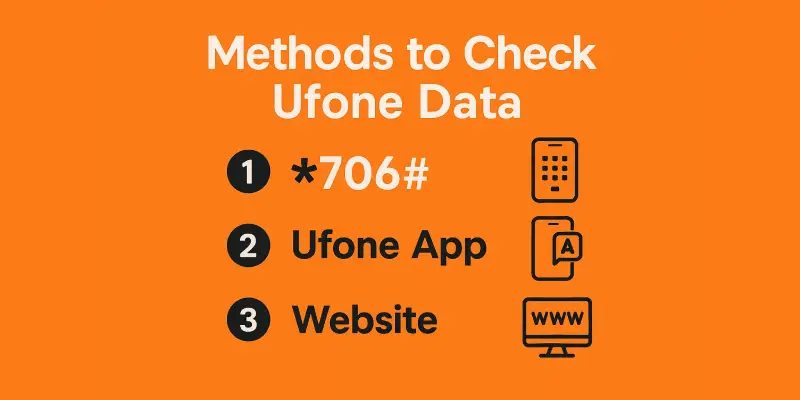
1. Check Ufone Data Using Code(simple way)
What is the Ufone code to Check Ufone Data?
The easiest way is to dial *706# on your phone. It works for prepaid and postpaid users.
Steps to Check Ufone Data
- Open your phone’s dial pad
- Dial *706# and press the call button
- Wait for a few seconds
- You’ll see a message with:
- Remaining MBs
- Package expiry date
- Your current package name
You don’t need internet or balance to use this code. It’s free and quick.
Other helpful Ufone codes
- Check balance: *124#
- Check remaining minutes: *707#
- Check SMS and data: *706#
Example
“I Check Ufone Data using *706# after watching YouTube, so I know how much is left before making a video call to my cousin in Faisalabad.”
2. Use the My Ufone App
Where to get the app
- Android: Google Play Store
- iPhone: Apple App Store
More than 1 million people have downloaded it.
How to use the app
- Install the app and open it
- Sign up with your Ufone number
- Enter the code sent to your phone
- You’ll see your remaining MBs, minutes, and packages
Why use the app?
- See your MBs in real time
- Buy or stop packages easily
- Get app only discounts
- View your recharge and usage history
The app also gives alerts when your data is almost finished, which helps you Check Ufone Data on time.
3. Check Ufone Data Online (Website Method)
If you use a laptop or computer, try Ufone’s online portal.
How to Check Ufone Data
- Go to https://www.ufone.com/selfcare/
- Sign in with your Ufone number
- Check Ufone Data, bundles, and recharge history
Best for
- Office workers
- Postpaid or business users
- People using Ufone internet devices
You can also Check Ufone Data usage from past weeks or months.
4. Check Ufone Data on 4G Devices or Dongles
If you use a Ufone internet device, here’s how to Check Ufone Data:
Steps
- Connect the device to your laptop or PC
- Open a browser and go to 192.168.8.1
- Login with username and password (default is usually “admin”)
- Go to “Statistics” or “Data Usage”
You’ll see how many MBs you have used or have left.
5. Ufone Data Alerts
Ufone sends free SMS alerts when your data is used up to:
- 50%
- 75%
- 90%
- 100%
How to turn alerts on or off
- Usually, these are turned on by default
- If you’re not getting them, call 333 or check the Ufone app
Why alerts help
They help you avoid running out of MBs without knowing. You can also buy a new bundle in time and Check Ufone Data again.
Local story
“My cousin in Lahore finished his MBs watching TikTok. He didn’t see the alert and lost Rs. 300 from his balance in half an hour.”
6. Problems While Checking Data
Code not working?
- Restart your phone
- Make sure your SIM is active
- Check if you typed the code correctly
App problems?
- Clear app cache
- Update the app
- Reinstall if needed
Package active but MBs not showing?
- Check Ufone Data expiry date
- Call Ufone support at 333 if needed
7. Ufone Internet Packages (Latest 2026 Bundles)
Here are some popular data packages from January 2026:
Daily Packages
- Daily Light: 1GB for Rs. 14.5 (*2256#)
- Daily Heavy: 2GB for Rs. 21 (*2258#)
Weekly Packages
- Weekly Max: 25GB with social apps for Rs. 330
- Weekly Internet Plus: 10GB for Rs. 250
Monthly Packages
- Monthly Light: 12GB for Rs. 390
- Monthly Heavy: 40GB for Rs. 699
You can activate these using:
- *3#
- My Ufone App
Fact
As per PTA, Ufone users in Pakistan use around 2.5GB per week on average. Always Check Ufone Data before using video apps.
8. Best Time to Check Ufone Data
Some Ufone packages reset at midnight. So checking at 11:59 PM and 12:01 AM can show different results.
Tips
- Check Ufone Data after watching videos or downloads
- Check before sleeping if you’re using a daily bundle
- Don’t check while roaming to avoid wrong info
9. Save Mobile Data on Ufone
Here’s how to use fewer MBs and still enjoy the internet:
Use data saver modes
- Turn on data saver in Chrome and YouTube
- Set Facebook and Instagram to Wi-Fi only for videos
Turn off auto updates
- Go to Play Store settings and turn off auto update over mobile data
Download on Wi-Fi
- Save Netflix, Spotify, or YouTube videos when you’re on Wi-Fi
Fact
- TikTok can use around 70MB in just 5 minutes if on high quality
Before using these apps, always Check Ufone Data so you don’t lose your balance.
Ufone vs Other Networks

| Feature | Ufone | Jazz | Zong | Telenor |
|---|---|---|---|---|
| USSD Code | *706# | 1174# | *102# | *999# |
| Mobile App | Yes | Yes | Yes | Yes |
| Alerts | Yes | Yes | Yes | Yes |
| Web Portal | Yes | Yes | Yes | Yes |
What I think
Ufone is simple and easy to use. Their app is basic but works well. Zong gives more control by SMS, but Ufone is perfect if you want fast, no hassle data checking.
Conclusion
Staying connected in Pakistan means managing your data wisely. Thankfully, Ufone makes it super simple to Check Ufone Data whether you use *706#, the My Ufone App, or even the website.
By making it a small habit, you’ll never face sudden balance cuts, dropped calls, or interrupted video streams. Think of it like checking your petrol gauge before a long drive you wouldn’t risk running out midway, right?
So whether you’re a student in Lahore attending online classes, a parent in Karachi calling family on WhatsApp, or someone in a small town just enjoying social media checking your MBs regularly keeps you worry free.
Stay smart, stay connected, and let Ufone’s simple tools help you enjoy the internet without surprises.