

My friend Ahsan is a freelance content creator in Karachi. Last month, he needed a product demo video for a client. Budget? Zero. Video editing skills? Basic. Time? Two days.
He tried Veo 3 AI through Google’s free trial. Typed a simple prompt A smartphone rotating slowly on a wooden desk, morning sunlight coming through window, soft ambient music.
Thirty seconds later, he had an 8 second cinematic clip with synchronized audio. No camera. No editing software. No professional equipment.
The client loved it. Ahsan got paid. And he spent exactly zero rupees on video production. That’s the power of Veo 3 AI in 2026. Let me show you how to access it for free.
What Actually Is Veo 3 AI?
Before we jump into the free access methods, let me tell you what Veo 3 AI actually does beyond the marketing fluff. Veo 3 AI is Google’s video generation model. You give it text, it gives you video. Sounds simple, but the execution is remarkable.
Here’s what makes Veo 3 AI different from other AI video generators
Native audio generation
Most AI tools create silent videos. You add sound separately. Veo 3 AI generates video and audio together. Dialogue, sound effects, background music all synchronized automatically. This is huge.
Real physics understanding
When Veo 3 AI shows water splashing or fabric moving, it looks real. The model understands how things actually move in the physical world.
Cinematic quality
We’re not talking about janky, weird AI videos anymore. Veo 3 AI outputs are genuinely cinematic 1080p resolution, proper lighting, realistic motion.
Prompt adherence
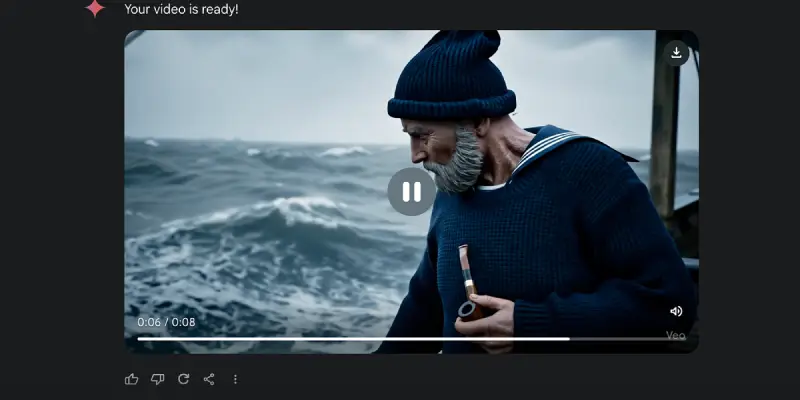
You ask for an old sailor with a grey beard holding a pipe and that’s exactly what Veo 3 AI gives you. It actually listens to your prompt.
I tested Veo 3 AI last week with this prompt: “A cat jumping onto a kitchen counter, knocking over a coffee mug, slow motion, dramatic lighting.”
What I got was a legitimate 8 second clip that looked like it was filmed with a real camera. The physics of the jump, the way the mug tipped over, even the subtle sound of the mug hitting the counter all generated by Veo 3 AI.
That’s when I realized this technology isn’t just interesting. It’s actually useful.
What Changed in Veo 3 AI in 2026
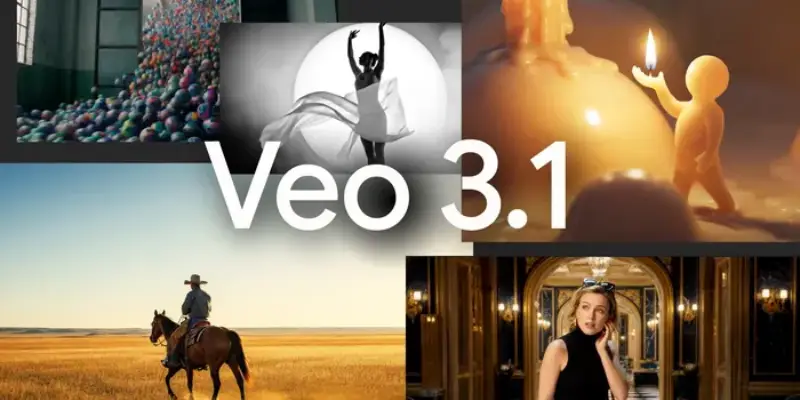
If you read about Veo 3 AI last year, things have evolved significantly in 2026. Let me break down what’s new.
Veo 3.1 Update (Released October 2025)
Google upgraded Veo 3 AI to version 3.1 and the improvements are noticeable:
Better audio quality
The sound was already good. Now it’s exceptional. Natural conversations, synchronized sound effects, richer soundscapes. My friend used Veo 3 AI to create a cafe scene. You could hear coffee machine sounds, distant chatter, cup clinking all perfectly timed.
Enhanced image to video
You can now upload a photo and Veo 3 AI will animate it into video. This is massive for product demos, social media content, or bringing old photos to life.
Reference images feature
Upload 1-3 reference images of a character or object. Veo 3 AI maintains that subject’s appearance throughout the video. Crucial for brand consistency.
Scene extension
Create videos longer than 8 seconds by extending scenes. Veo 3 AI generates new clips based on the last second of your previous video, maintaining visual continuity.
Integration Into Major Platforms
Veo 3 AI isn’t isolated anymore. By 2026, it’s integrated into tools millions already use:
Canva
If you have Canva Pro, you can access Veo 3 AI directly inside Canva. Generate video clips and immediately edit them with Canva’s tools.
Flow
Google’s dedicated filmmaking tool built specifically for Veo 3 AI. Over 275 million videos have been created in Flow since launch.
Vertex AI
For developers and enterprises, Veo 3 AI is available through Google Cloud’s Vertex AI platform.
This integration means accessing Veo 3 AI doesn’t require learning a new complicated interface. It’s where you already work.
How to Access Veo 3 AI for Free in 2026
Now let’s get to what you actually want to know how to use Veo 3 AI without paying.
Method 1: Google AI Premium Free Trial
Google offers a one month free trial of Google AI Premium. This includes access to Veo 3 AI through the Gemini app and Flow.
What you get
- 100 video generations per month with Veo 3 AI
- Access to Flow’s filmmaking tools
- Higher quality outputs
- No watermarks
How to activate
- Go to gemini.google.com or download the Gemini app
- Click “Upgrade” or “Try Premium”
- Select the one month free trial
- Enter payment details (won’t be charged during trial)
- Cancel before trial ends if you don’t want to continue
Pro tip
Set a reminder for day 28 to cancel if you’re not interested in paid version. I’ve done this twice already works perfectly.
My cousin Zara used this method. She’s a university student making presentation videos. Generated 15 clips during her free month, never got charged.
Method 2: Google Cloud Free Credits ($300)
This is the method I personally use for Veo 3 AI. Here’s why it’s brilliant:
New Google Cloud users get $300 in free credits valid for 90 days. You can use these credits to access Veo 3 AI through Vertex AI.
What you get
- $300 to spend on Google Cloud services
- Access to both Veo 3 AI and Veo 3 AI Fast
- 90 days to use the credits
- More technical control over generation
How to activate
- Go to cloud.google.com
- Click “Get started for free”
- Sign up with your Google account
- Verify with credit/debit card (no charges)
- Navigate to Vertex AI in the console
- Enable Veo 3 AI APIs
The catch
This requires some technical knowledge. You’re working with code and APIs, not a simple user interface. But there are tutorials and documentation available.
If you’re studying computer science, IT, media production, or just comfortable with technology, this method gives you the most flexibility with Veo 3 AI.
Method 3: Canva Free Trial + Veo 3 AI
Canva integrated Veo 3 into their platform in late 2025. If you start a Canva Pro free trial, you get access to Veo 3 inside Canva.
What you get
- 30 day Canva Pro trial
- 5 Veo 3 video generations per month
- Immediate access to Canva’s editing tools
- Easy integration into existing designs
How to activate
- Go to canva.com
- Sign up for account (or log in)
- Start Canva Pro free trial
- Open Video Editor
- Look for “Create a Video Clip” powered by Veo 3
This method is perfect if you’re already creating content in Canva. The limitation is only 5 generations monthly, but for many users, that’s enough.
My neighbor who runs an Instagram page for her homemade food business uses this. Five product videos per month, edited and posted directly from Canva. Works perfectly for her needs with Veo 3.
Method 4: Educational Access Programs
If you’re a student, Google occasionally offers extended free access to Veo 3 through educational programs.
What to check
- Your university’s Google Workspace agreement (some include AI credits)
- Google for Education programs in Pakistan
- Student developer programs offering cloud credits
- Regional educational initiatives
These programs vary by region and time. The big student promotion that ran in early 2025 has ended, but new educational initiatives launch regularly.
How to find opportunities
- Check your .edu email for Google announcements
- Visit google.com/edu and look for AI programs
- Join Google Developer Student Clubs at your university
- Follow Google Developers Pakistan on social media
My friend attends FAST University. Their CS department got bulk credits for cloud services, including Veo 3 access for all students. Worth checking if your institution has similar arrangements.
Method 5: Platform Specific Promotions
Several platforms that integrated Veo 3 offer their own trial periods:
Freepik: Offers AI Suite trials that include Veo 3 access
Leonardo.AI: Rolling out Veo 3 to paid users with trial options
Other platforms: Keep announcing Veo 3 integration with promotional access
Follow these platforms and watch for announcements about Veo 3 trials.
Real Examples: What People Create With Veo 3
Let me show you what actual users are creating with Veo 3 in 2026. These aren’t promotional materials these are real use cases.
Content Creators
Fashion blogger from Lahore
Used Veo 3 AI to create product showcase videos. Prompt: “Elegant dupatta flowing in slow motion, golden hour lighting, outdoor garden setting.”
Generated 20 videos during free trial. Doubled her Instagram engagement. Cost: Zero rupees.
Tech reviewer
Creates B roll footage for YouTube videos using Veo 3. Things like “laptop on desk with coffee, morning light, subtle camera movement.”
Saves hours of filming time. His channel grew 40% because he can post more frequently.
Students and Educators
University presentation
Student used Veo 3 for history presentation. Created visualization of ancient Mohenjo Daro with prompt: “Ancient city street, people in traditional clothing, bustling marketplace, afternoon sun.”
Professor was impressed. Project grade: A.
Language teacher
Creates scenario videos for English learning using Veo 3. “Two friends meeting at a cafe, casual conversation, friendly atmosphere.”
Her online classes became more engaging. Student retention increased.
Small Businesses
Restaurant owner
Uses Veo 3 for social media posts. “Biryani plate with steam rising, close up shot, appetizing lighting.”
Each video gets 3x more engagement than photos. Orders increased 25%.
Freelance designer
Pitches clients with video mockups created using Veo 3. “Logo animation reveal, modern corporate style, professional lighting.”
Lands more clients because proposals look professional.
These aren’t special cases. These are regular people using Veo 3 intelligently during their free access periods.
The Limitations You Should Know About Veo 3 AI
I believe in honesty. Veo 3 is powerful but not perfect. Here’s what you need to know.
Video Length Restriction
Veo 3 generates 4, 6, or 8 second clips maximum per generation. Not full videos.
Workaround
Use scene extension feature to chain multiple clips. Or generate several clips and edit them together.
Quality Inconsistency
Sometimes Veo 3 nails your prompt perfectly. Sometimes it misinterprets or adds weird elements.
Example
I asked for “person walking down street.” Got a person walking backwards. Tried again, worked perfectly.
You need to iterate. Generate, check, regenerate if needed. Factor this into your time.
Text in Videos
Veo 3 struggles with text. If you need readable text in videos, add it in post production.
Complex Scenes
Really complex prompts with many elements sometimes confuse Veo 3. Keep prompts clear but detailed.
Bad prompt
“Ten people at party, some dancing, some talking, balloons, cake, DJ, lights, everyone wearing blue.”
Better prompt
“Party scene with people dancing, colorful lighting, festive atmosphere.”
Cultural Specificity
Veo 3 sometimes defaults to Western contexts. If you want specifically Pakistani scenes, be explicit in prompts.
Example
Instead of “street market,” try “Pakistani bazaar with vendors, colorful fruits, busy crowd, traditional stalls.”
Audio Limitations
While Veo 3 generates audio, you can’t control it precisely. You can’t specify exact music genres or specific sound effects. You describe the atmosphere and Veo 3 interprets.
These limitations are real. But understanding them helps you use Veo 3 more effectively.
Tips for Getting Best Results from Veo 3 AI
After months using Veo 3, here’s what actually works:
Prompt Writing Strategy
Be specific but concise
“Golden retriever running through park, autumn leaves falling, slow motion, warm afternoon light” works great.
“Dog maybe running or walking in some outdoor area with trees” too vague.
Include camera angles
“Close up shot,” “wide establishing shot,” “over the shoulder view” Veo 3 understands these.
Describe lighting
“Soft morning light,” “dramatic sunset,” “studio lighting” makes huge difference in Veo 3 output quality.
Mention audio atmosphere
“Gentle background music,” “city sounds,” “peaceful silence” helps Veo 3 generate appropriate audio.
Iteration Process
Don’t expect first generation to be perfect. With free credits, you can afford to try multiple times.
- Generate first version with Veo 3
- Identify what’s wrong
- Refine prompt
- Generate again
- Compare results
I usually get my desired output within 2-3 iterations using Veo 3.
Use Reference Images
If you have Veo 3 access through Flow or API, use reference images. Upload a photo of your product, your brand colors, or desired style.
Veo 3 will match that aesthetic much better than describing it in text.
Combine Multiple Clips
Remember, Veo 3 gives you short clips. Plan to generate several and edit them together for complete videos.
This actually gives you more creative control than generating one long video.
Understanding Veo 3 Pricing After Free Period
Eventually, your free trial or credits end. What then?
Google AI Premium Pricing
After free trial ends, Google AI Premium costs about $20/month (approximately 5,500 PKR).
Includes
- 100 Veo 3 generations monthly
- Access to Gemini Advanced
- Higher usage limits across Google AI tools
Worth it if
You create content regularly and 100 videos monthly is useful for you.
Pay Per Use Through Vertex AI
If you go the cloud route with Veo 3, pricing is usage-based. You pay per video generated.
Current rates (as of January 2026):
- Veo 3 AI standard: ~$0.10-0.15 per 8-second clip
- Veo 3 AI Fast: ~$0.05-0.08 per 8-second clip
Worth it if
You generate videos occasionally, not regularly. Pay only for what you use.
Canva Pro Integration
Canva Pro costs $10-13/month (approximately 2,800-3,600 PKR) and includes 5 Veo 3 generations monthly.
Worth it if
You already use Canva for design work. Veo 3 becomes a bonus feature.
My Honest Take
For most Pakistani users, the free methods I described above give you enough to test Veo 3 thoroughly. If you then find it valuable for your work, the paid plans become investments rather than expenses.
I personally stick with Google Cloud credits, topping up occasionally when I have projects that need Veo 3.
Veo 3 AI vs Other Video Generators
You might wonder: how does Veo 3 compare to alternatives?
Runway ML
Popular but expensive. Better interface, similar quality. Costs add up quickly.
Pika Labs
Great for creative experimentation. Veo 3 has better prompt adherence.
Synthesia
Better for talking head videos. Veo 3 better for cinematic scenes.
Traditional video editing
Still needed for complex projects. Veo 3 is tool, not replacement.
Veo 3 AI’s biggest advantage: native audio generation and Google’s infrastructure. Plus, more accessible pricing for students and creators starting out.
The Future of Veo 3 AI
Based on Google’s trajectory, here’s what to expect from Veo 3:
Longer videos
Currently 8 seconds max. Expect this to extend to 30 seconds, then full minutes.
Better consistency
Multiple clips maintaining same characters and style.
More control
Fine tune specific aspects like camera movement, lighting, audio mix.
Wider integration
More platforms incorporating Veo 3 directly.
Google invested heavily in Veo 3. Over 70 million videos created since launch. They’re not slowing down.
Your Action Plan to Start With Veo 3 AI
Here’s exactly what to do today:
If you’re a student
- Check if your university has Google Cloud or AI program credits
- Sign up for Google AI Premium free trial using student email
- Explore Veo 3 through Gemini app
If you’re a content creator
- Start Google AI Premium one month trial
- Generate 20-30 clips to understand Veo 3 capabilities
- Decide if paid plan makes sense for your workflow
If you’re technically inclined
- Claim $300 Google Cloud credits
- Set up Vertex AI access to Veo 3
- Experiment with API integration
If you just want to try
- Sign up for Canva Pro trial
- Test Veo 3 through “Create a Video Clip”
- See if 5 videos monthly meets your needs
Don’t overthink it. Pick one method. Try Veo 3. You’ll know within days if it’s valuable for you.
Conclusion
Veo 3 AI represents something bigger than just another AI tool. It’s democratizing video creation. Five years ago, cinematic video required cameras worth lakhs, lighting equipment, editing software, technical knowledge.
Today, Veo 3 AI lets a student in Lahore create professional looking clips with just text prompts. Is it perfect? No. Does it replace professional videography? No. Will it keep improving? Absolutely. The question isn’t whether Veo 3 AI is the “best” tool. The question is: can it help you right now?
For Ahsan, my friend in Karachi, Veo 3 AI helped him deliver client work with zero budget. That’s real value. For my cousin studying graphic design, Veo 3 AI helped her create a portfolio project that landed her an internship. That’s real impact.
For the restaurant owner using it for Instagram, Veo 3 AI helped increase orders by 25%. That’s real business results. What could Veo 3 AI help you do? There’s only one way to find out. Try it. The free methods I shared give you nothing to lose opportunity to explore.
Generate some videos. See what happens. Maybe you’ll surprise yourself. That 8 second clip might change more than you expect.
FAQs
Q1: What is Veo 3 AI and what does it do?
Veo 3 AI is Google’s video generation model that creates cinematic 8 second videos with synchronized audio from text prompts or images.
Q2: How much does Veo 3 AI cost to use?
Free options include one month trials and $300 Google Cloud credits; paid plans start at $20/month for 100 generations.
Q3: Can Pakistani users access Veo 3 AI for free?
Yes, through Google AI Premium free trial, Google Cloud credits, or Canva Pro trial with VPN if needed.
Q4: What’s the difference between Veo 3 AI and Veo 3 AI Fast?
Veo 3 AI offers highest quality cinematic output Veo 3 AI Fast generates videos faster with slightly lower quality.
Q5: How long are videos created by Veo 3 AI?
Individual clips are 4, 6, or 8 seconds; use scene extension feature to create longer videos up to one minute or more.
Q6: Does Veo 3 AI generate audio automatically?
Yes, Veo 3 AI creates synchronized audio including dialogue, sound effects, and background music natively with video.
Q7: Can I use Veo 3 AI videos for commercial purposes?
Free trial usage is generally for personal/educational use; paid plans allow commercial use but check specific terms.
Q8: What’s new in Veo 3 AI in 2026?
Version 3.1 released with better audio, image to video, reference images for consistency, and scene extension capabilities.
Q9: Is Veo 3 AI better than other AI video generators?
Veo 3 AI excels in native audio generation, prompt adherence, and physics realism compared to most alternatives.
Q10: How do I get the best results from Veo 3 AI?
Write specific prompts with camera angles and lighting details, use reference images when available, and iterate 2-3 times for best output.